
Best Humanoid Robots for Elderly Care UK: Safety & Features Guide
Expert guide to humanoid robots that can assist with elderly care in UK homes. Covering companionship, monitoring, mobility assistance and safety.
Robots4Home Team
robots4home.uk
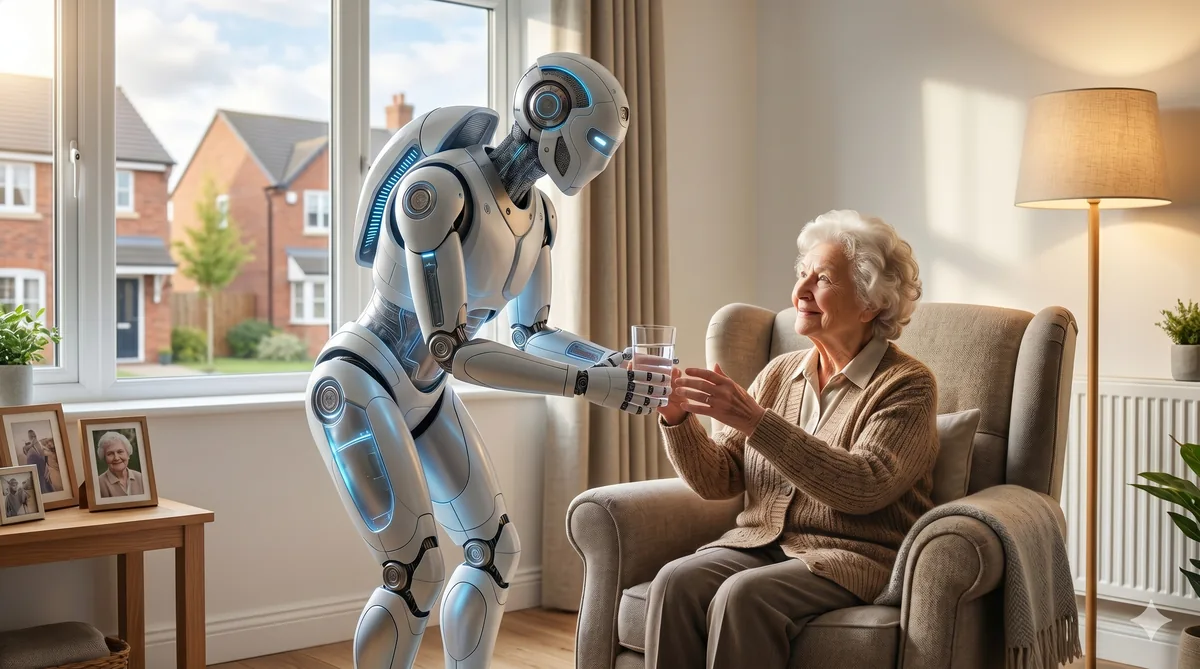
If you’re considering a humanoid robot to help care for an elderly relative at home, you’re not alone. With UK social care under enormous pressure and waiting lists growing longer each year, more families are exploring technology-assisted care as a practical supplement to human support. But this is a decision that demands careful thought — we’re talking about the safety and wellbeing of a vulnerable person.
In this guide, we walk through exactly what to look for in a humanoid robot for elderly care, compare the leading models available in the UK, and help you understand whether this technology is right for your family’s situation. If you’re new to the broader topic, our complete guide to humanoid robots for elderly care covers the fundamentals in depth.
Key Features That Matter for Elderly Care
Not every humanoid robot is suitable for elderly care. The features that matter most in this context are quite different from what you’d prioritise for general household use. Here’s what we consider essential.
Gentle, Predictable Movement
This is non-negotiable. Any robot operating near an elderly person must move slowly, smoothly, and predictably. Sudden movements can startle, disorient, or physically endanger someone with limited mobility or balance issues. Look for robots with adjustable speed settings, soft exterior surfaces, and force-limited actuators that stop immediately on contact.
Voice Interaction and Communication
Many elderly users will find voice interaction far more natural than touchscreens or apps. The robot should respond to spoken commands clearly and patiently, handle repeated requests without frustration cues, and speak at an adjustable volume with clear enunciation. Support for hearing-impaired users — including visual cues alongside speech — is a significant advantage.
Fall Detection and Emergency Response
Falls are the leading cause of injury-related hospital admissions for over-65s in the UK. A robot with reliable fall detection that can automatically alert family members or emergency services adds a genuinely valuable safety layer. The best systems combine visual detection with audio cues and can distinguish between a fall and someone simply sitting on the floor.
Medication Reminders and Health Monitoring
Medication adherence is a persistent challenge in elderly care. A robot that can deliver timed reminders, confirm whether medication has been taken, and log this information for family members or carers addresses a real and daily need. Some models also offer basic vital sign monitoring, though this should never replace proper medical equipment.
Companionship and Cognitive Engagement
Loneliness and social isolation affect a significant proportion of older adults in the UK. A robot that can hold basic conversations, play games, read aloud, or facilitate video calls with family provides genuine companionship value — even if it’s no substitute for human contact.
Our Top Picks for Elderly Care
We’ve evaluated the current generation of humanoid robots specifically through the lens of elderly care suitability. For our full reviews and broader comparisons, see our roundup of the best humanoid robots for UK homes.
1X NEO — Best Overall for Elderly Care (From £16,000)
The 1X NEO is our top recommendation for families serious about robotic elderly care assistance. Its movement system is specifically designed for safe human interaction, with compliant actuators that yield on contact rather than pushing through resistance. The NEO offers comprehensive voice interaction, fall detection with automatic alerts, medication reminder scheduling, and the ability to assist with light household tasks such as fetching items or opening doors.
Its AI-driven behaviour adapts over time to the specific routines and preferences of the user, which is particularly valuable for elderly people who thrive on consistency. The NEO can also facilitate video calls, provide cognitive stimulation through conversation and games, and monitor activity patterns to flag potential concerns to family members.
Best for: Families wanting comprehensive care support who can invest in a premium solution.
Key limitation: The price point places it beyond many household budgets, though we discuss the value proposition against care alternatives below.
Unitree R1 — Budget Option With Limitations (From £3,900)
The Unitree R1 offers a more accessible entry point for families exploring robotic care assistance. It provides basic voice interaction, scheduled reminders, and simple companionship features at roughly a quarter of the NEO’s price.
However, we must be straightforward about its limitations in an elderly care context. Its movement system, while competent, lacks the refined force-limiting of the NEO — meaning closer supervision is advisable during physical interactions. Fall detection is available but relies primarily on visual processing, which can be less reliable in low-light conditions or cluttered rooms. The R1’s AI capabilities are also more limited, so conversations feel less natural and adaptive.
Best for: Families wanting basic robotic companionship and reminders on a tighter budget, where the robot supplements rather than replaces regular human check-ins.
Key limitation: Not suitable as a primary safety or monitoring system. Movement safety requires more careful setup and monitoring.
NOETIX Bumi — Companion Only (From £1,100)
The NOETIX Bumi occupies a different category entirely. At just over a thousand pounds, it’s an affordable companion robot rather than a care assistant. It handles conversation, entertainment, video calling, and basic reminders well, but it lacks the physical capability or safety systems needed for any hands-on care tasks.
Best for: Adding companionship and mental stimulation for an elderly person who already has adequate physical care provision.
Key limitation: No fall detection, no physical assistance capability, and limited mobility means it functions as a stationary or semi-mobile companion rather than a care robot.
Comparison Table: Elderly Care Features
| Feature | 1X NEO (£16,000) | Unitree R1 (£3,900) | NOETIX Bumi (£1,100) |
|---|---|---|---|
| Gentle movement system | Excellent — force-limited | Adequate — needs setup | Limited mobility |
| Voice interaction | Natural, adaptive AI | Functional, basic AI | Good conversational AI |
| Fall detection | Yes — multi-sensor | Yes — visual only | No |
| Emergency alerts | Automatic, multi-channel | App notification | No |
| Medication reminders | Yes — with confirmation | Yes — basic scheduling | Yes — basic scheduling |
| Physical assistance | Light tasks (fetching, doors) | Very limited | None |
| Companionship quality | High — adaptive personality | Moderate | Good — conversation focus |
| Video calling | Yes | Yes | Yes |
| Activity monitoring | Yes — pattern analysis | Basic logging | No |
| Night operation | Yes — infrared sensors | Limited | No |
| UK support available | Yes | Limited | Yes |
Safety Requirements You Must Not Overlook
Bringing any robot into an elderly person’s home demands rigorous attention to safety. We cover this topic comprehensively in our humanoid robot safety guide, but the essentials for elderly care are as follows.
Physical safety certification. Ensure any robot you purchase carries appropriate CE/UKCA marking and has been assessed for domestic use. This is a minimum, not a guarantee of suitability.
Emergency stop accessibility. The elderly user must be able to stop the robot instantly and easily — whether through a large physical button, a simple voice command, or both. Test this thoroughly before leaving the robot unsupervised.
Obstacle and trip hazard management. The robot itself must not become a trip hazard. Ensure charging cables are routed safely, that the robot parks in a consistent location, and that its movement paths are kept clear of obstacles.
Data privacy and security. Cameras and microphones in the home of a vulnerable person raise serious ethical and legal considerations. Understand exactly what data is collected, where it’s stored, how it’s protected, and who can access it. Under UK GDPR, the elderly person (or their legal representative) must give informed consent.
Regular safety audits. We recommend monthly checks of all safety features — emergency stops, fall detection accuracy, alert systems — to ensure everything continues to function correctly.
Installation and Setup for Elderly Users
Setting up a robot for an elderly user is fundamentally different from setting one up for yourself. Plan for these considerations.
Pre-installation home assessment. Walk through the home and identify potential hazards: loose rugs, narrow doorways, stairs, low furniture, pets, and areas with poor lighting. Many of these can be addressed before the robot arrives.
Simplified interfaces. Configure the robot’s controls to be as simple as possible. Remove unnecessary features from the primary interface, increase text sizes, and ensure the most-used functions (calling for help, requesting reminders) are accessible with a single command.
Gradual introduction. Don’t simply install the robot and leave. Plan for a settling-in period of at least two weeks where a family member is regularly present to help the elderly user build familiarity and confidence. Rushing this step almost always leads to the robot being switched off and ignored.
Family member training. At least two family members should understand the robot’s full operation, monitoring capabilities, and troubleshooting procedures. If only one person knows how to fix issues, you’ve created a single point of failure.
Ongoing Support and Maintenance
A robot for elderly care is not a set-and-forget purchase. Budget for and plan around these ongoing needs.
Software updates must be applied regularly — these often include safety improvements. Arrange for a tech-comfortable family member to manage this, or confirm that the manufacturer offers managed update services.
Remote monitoring setup allows family members to check on the robot’s status and the elderly user’s activity patterns without being physically present. All three robots we’ve reviewed offer some form of this, though the depth of information varies considerably.
Manufacturer support quality varies. The 1X NEO currently offers the most robust UK support infrastructure. Check warranty terms, response times, and whether in-home service is available — sending a robot away for repair defeats its purpose if your relative depends on it.
Cost and Value: How Robots Compare to Care Alternatives
Let’s address the elephant in the room. At £16,000, the 1X NEO costs roughly the same as 8-10 months of a professional home carer visiting for one hour daily. Over a three-year period, the robot becomes significantly more cost-effective for supplementary monitoring and companionship — though it cannot replace the human judgement, physical dexterity, and emotional depth of a trained carer.
The Unitree R1 at £3,900 compares favourably to just two to three months of equivalent human care visits, making it accessible for families wanting to supplement existing arrangements rather than replace them.
The NOETIX Bumi at £1,100 sits in a similar price range to a few months of a befriending service, offering 24/7 companionship availability at a one-off cost.
Our honest assessment: these robots work best as part of a blended care approach — combining human carers for complex physical and emotional needs with robotic assistance for monitoring, reminders, companionship, and safety alerts. No current robot should be relied upon as the sole care provision for a vulnerable elderly person.
What to Look For
- Force-limited movement systems with immediate stop capability
- Reliable fall detection validated in home environments
- Clear, patient voice interaction with adjustable volume
- Medication reminder systems with confirmation and logging
- Robust UK-based support and warranty provisions
- Strong data privacy protections compliant with UK GDPR
- Proven track record with elderly users, not just lab demonstrations
What to Avoid
- Any robot marketed primarily for industrial or commercial use being repurposed for home care
- Models without clear UK safety certification (CE/UKCA marking)
- Robots that require constant internet connectivity for basic safety features — broadband outages happen
- Manufacturers who cannot provide clear answers about data handling and privacy
- Extremely cheap robots from unknown manufacturers with no UK support presence
- Any claim that a robot can fully replace human care — this technology supplements, it does not substitute
Making Your Decision
Choosing a robot for an elderly relative’s care is a deeply personal decision that balances budget, care needs, technological comfort, and family circumstances. We’d encourage you to start by reading our detailed guide to humanoid robots in elderly care for the broader context, then explore the individual reviews of the 1X NEO and Unitree R1 to understand the specific capabilities of each model.
If you’re still weighing your options across all use cases, our guide to the best humanoid robots for UK homes provides a wider perspective. And whatever you decide, please don’t skip our safety guide — when it comes to protecting a vulnerable family member, thorough preparation is everything.