
Humanoid Robots for Child Education: Learning & STEM Development
How humanoid robots can enhance your child's education. STEM learning, programming basics, and age-appropriate robot recommendations.
Robots4Home Team
robots4home.uk
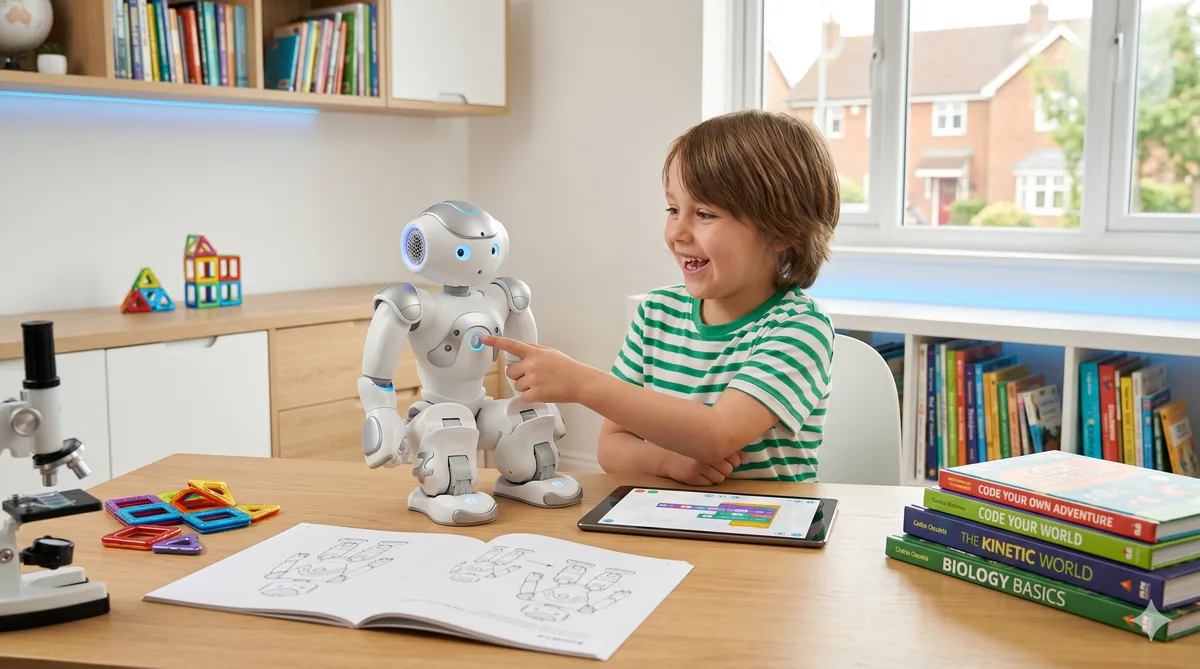
There is something uniquely powerful about a child looking up at a robot, asking it a question, and watching it respond with movement and speech. Tablets and laptops have their place, but a physical humanoid robot turns abstract STEM concepts into something a child can see, hear, and touch. We have spent months testing how different humanoid robots handle educational tasks — from teaching five-year-olds basic sequencing to guiding teenagers through their first Python scripts — and the results have genuinely impressed us. If you are considering a humanoid robot as a learning tool for your child, this guide covers everything you need to know before spending a penny.
For a broader look at choosing a robot for the whole family, our family robot companion guide is a useful companion piece to this article.
Why Humanoid Robots Work for STEM Learning
The core advantage of a humanoid robot over a screen-based learning app is embodiment. When a child writes a programme that makes a robot walk forward, turn left, and wave, the feedback is immediate and physical. Mistakes are obvious — the robot walks into a wall or waves at the wrong moment — and the child naturally wants to fix the problem and try again. That loop of code, observe, debug, and improve mirrors real engineering practice in a way that no purely digital environment can replicate.
Beyond coding, humanoid robots introduce children to mechanical engineering (how joints and servos work), electrical engineering (sensors, batteries, power management), mathematics (coordinates, angles, timing), and even social science (how humans respond to robots and vice versa). A single afternoon with a programmable humanoid can touch on more STEM disciplines than a week of textbook lessons.
The physical presence also matters for engagement. Studies from educational robotics programmes consistently show that children spend longer on tasks, collaborate more willingly with peers, and retain concepts more effectively when a tangible robot is involved. We have seen this firsthand — children who normally lose interest after ten minutes on a tablet will happily spend an hour debugging a robot dance routine.
Age-Appropriate Interactions
Not every child benefits from the same kind of robot interaction. We break it down into three broad age bands based on our testing.
Ages 5 to 8: Guided Discovery
At this age, the robot is primarily a source of wonder and structured play. Children are not ready to write code independently, but they can follow simple drag-and-drop sequences with adult guidance. The best interactions involve the robot telling stories, asking questions, leading movement games, and responding to basic voice commands. Look for robots with pre-loaded educational content covering early maths, phonics, and basic science concepts.
Safety supervision is essential at this age. We recommend that an adult is always present during robot interactions, and that sessions are kept to 20—30 minutes. Our safety guide for humanoid robots has detailed age-specific supervision rules worth reading before your child’s first session.
Ages 9 to 12: Active Programming
This is the sweet spot for educational robotics. Children in this range have the cognitive development to understand cause and effect in programming, the patience to debug simple errors, and the creativity to design their own robot behaviours. Visual block-based coding environments — similar to Scratch — are ideal here. Children can programme movement sequences, create conditional responses (if the robot sees a red object, turn left), and build increasingly complex routines.
We found that children in this age group benefit enormously from project-based challenges. Tasks like “programme the robot to navigate from the kitchen doorway to the sofa without bumping into anything” teach spatial reasoning, sensor logic, and iterative problem solving in a single activity.
Ages 13 and Above: Text-Based Coding and Advanced Projects
Teenagers who have outgrown visual block coding are ready for text-based programming languages. Python is the standard here, and several humanoid robots offer full Python SDKs that give access to sensor data, motor control, speech synthesis, and computer vision. At this level, the robot becomes a genuine development platform rather than a toy.
Advanced projects for this age group include programming autonomous navigation routines, building custom voice assistant behaviours, integrating the robot with smart home systems, and even experimenting with machine learning models that run on the robot’s onboard hardware. For teenagers considering engineering or computer science at university, this kind of hands-on experience is invaluable. Our beginner’s guide to programming your robot covers the fundamentals of getting started with code-based customisation.
Programming Skills Development: From Blocks to Python
The progression from visual coding to text-based programming is one of the most valuable educational pathways a humanoid robot can offer.
Visual block coding uses colourful, interlocking blocks that represent programming concepts — loops, conditionals, variables, functions — without requiring children to type syntax or remember commands. It removes the frustration of typos and semicolons while preserving the logical thinking that programming demands. Most educational robots aimed at the 8—12 age range include a visual coding environment in their companion app.
Transitional environments bridge the gap between blocks and text. Some robots offer a hybrid mode where children can see the Python (or JavaScript) code that corresponds to their block arrangement. This teaches syntax gradually and gives children the confidence to start editing text directly.
Full Python SDKs open up the robot’s complete capabilities. Teenagers and adult learners can write scripts that control every aspect of the robot’s behaviour, access raw sensor feeds, and build sophisticated applications. Python is the most commonly supported language because of its readability, its dominance in AI and data science, and the vast ecosystem of libraries available.
Robot Recommendations by Age
We have tested several humanoid robots in educational settings, and two stand out for UK families.
NOETIX Bumi — Best for All Ages
The Bumi from NOETIX is our top recommendation for families with children of any age. At roughly £1,100, it is the most affordable walking humanoid on the UK market, and its educational ecosystem is genuinely excellent. The visual programming environment is intuitive for children aged eight and up, the Python SDK is capable enough for teenagers and university students, and the pre-loaded content library covers everything from basic maths to introductory robotics concepts.
For younger children (5—8), the Bumi’s voice interaction, dance routines, and storytelling modes provide engaging screen-free entertainment with an educational slant. For older children, the structured curriculum of programming projects builds skills progressively. It is rare to find a single product that serves such a wide age range effectively.
Unitree R1 — Best for Teenagers and Advanced Learners
The Unitree R1 is a significantly more capable (and more expensive) machine aimed at teenagers who are serious about robotics and programming. Its advanced manipulation abilities, faster movement, and more powerful onboard computing make it suitable for complex projects that would push the Bumi beyond its limits. If your teenager is already comfortable with Python and wants a platform that will challenge them through sixth form and into university, the R1 is the better long-term investment. See our full comparison of top home robots for detailed specifications.
Integrating Robots into the Curriculum
Humanoid robots are not just toys for the home — they align directly with the UK computing curriculum at Key Stages 2 and 3. Schools across the country are beginning to adopt programmable robots for lessons covering algorithms, programming, data handling, and computational thinking.
At home, parents can reinforce these curriculum links by setting challenges that mirror classroom learning. Ask your child to programme the robot to follow a set of instructions (algorithms), to respond differently based on sensor input (selection and conditionals), or to repeat an action a set number of times (iteration and loops). These are not abstract exercises when a physical robot is carrying them out in the living room.
For home-educated families, a programmable humanoid robot can serve as the backbone of an entire computing curriculum. The structured project libraries that come with robots like the Bumi map well to Key Stage expectations, and the progression from visual blocks to Python mirrors the journey that schools aim to deliver over several years.
Safety Considerations Around Children
Any robot operating near children needs careful safety management. We cover this topic extensively in our humanoid robot safety guide, but the key points bear repeating here.
Always supervise children under ten during robot interactions. Ensure every family member knows how to trigger the emergency stop — physical button, voice command, and app kill switch. Define no-go zones in the companion app to keep the robot out of bedrooms during sleeping hours. Teach children that the robot is not a climbing frame; humanoid robots have a high centre of gravity and can topple if pushed or pulled. Finally, keep charging cables and docking stations out of reach of very young children.
Robots designed with education in mind, like the Bumi, typically include child-safe design features such as rounded edges, pinch-free joints, and automatic force limiting on moving parts. Always verify that any robot you buy carries the UKCA or CE mark for your peace of mind.
Screen Time vs Robot Time
One of the most common questions parents ask us is whether robot time counts as screen time. Our view is that it does not — or at least, not in the way that passive screen consumption does. When a child interacts with a humanoid robot, the experience is physical, social, and creative. The child is moving around the room, speaking aloud, observing real-world cause and effect, and solving tangible problems. Even when using a tablet to write code for the robot, the activity is goal-directed and hands-on rather than passive.
That said, we still recommend sensible time limits. Twenty to thirty minutes for younger children, up to an hour for older ones, with breaks in between. The goal is focused, productive interaction — not marathon sessions.
Cost vs Educational Value
Humanoid robots are not cheap, and families rightly ask whether the investment is worthwhile compared to other educational tools.
The Bumi at £1,100 costs roughly the same as two years of weekly coding club fees, or a good-quality laptop. The difference is that it provides a unique, embodied learning experience that a laptop simply cannot replicate, and it remains useful across a wide age range. A child who starts with guided play at age six can still be writing advanced Python projects on the same robot at sixteen.
The Unitree R1 is a larger investment, but for a teenager who is serious about pursuing engineering or computer science, it compares favourably with the cost of private tutoring or specialist summer programmes. The hands-on portfolio of projects a teenager can build with an R1 is also a genuine asset for university applications.
Parental Controls and Monitoring
Modern educational robots offer robust parental controls through their companion apps. Features to look for include:
- Usage time limits — set daily or weekly caps on robot interaction time
- Content filtering — restrict the topics the robot’s AI assistant will discuss
- Activity logs — review what your child has been doing with the robot, including programmes they have written and questions they have asked
- Remote monitoring — check the robot’s camera feed from another room (with clear household rules about when this is appropriate)
- Permission levels — restrict younger children to entertainment and guided learning modes while giving older children access to programming tools
Both the Bumi and R1 include comprehensive parental controls. We recommend spending time configuring these before your child’s first unsupervised session.
Success Stories and Honest Limitations
We have heard encouraging reports from families who use humanoid robots as educational tools. Children who previously showed little interest in maths or science have become engaged through robot programming challenges. Teenagers have used robot projects as the foundation of successful GCSE and A-level coursework. Several families have told us that their child’s confidence with technology improved dramatically after a few months of regular robot interaction.
However, we want to be honest about the limitations. A humanoid robot is not a replacement for a good teacher. It cannot adapt to a child’s emotional state the way a human can, it cannot explain a concept in five different ways until one clicks, and it cannot provide the encouragement and mentorship that inspire long-term passion. The robot is a tool — a brilliant, engaging, uniquely motivating tool — but it works best when combined with human guidance, whether from a parent, tutor, or teacher.
Battery life is also a practical constraint. Most educational sessions will fit within a single charge cycle, but if your child is on a roll with a complex project, a mandatory 90-minute charging break can be frustrating.
Comparison with Dedicated Educational Robots
Humanoid robots are not the only option for STEM learning. Dedicated educational robots like the Miko 3 and Sphero line deserve consideration, particularly for younger children or tighter budgets.
Miko 3 is a small, screen-faced companion robot designed specifically for children aged five to ten. It excels at conversational interaction, emotional engagement, and structured educational content. It is significantly cheaper than a humanoid robot and does not require a complex setup. However, it cannot walk, has no programmable movement, and offers far less scope for older children to develop coding skills. Buy Miko 3 on Amazon UK
Sphero robots (particularly the BOLT and RVR models) are outstanding for teaching programming fundamentals. They are rugged, affordable, and supported by an excellent visual coding environment. The limitation is that they are rolling balls or wheeled platforms — they lack the humanoid form factor that makes children feel they are interacting with a character rather than a gadget. Buy Sphero BOLT on Amazon UK
A humanoid robot like the Bumi occupies a middle ground: it offers the personality and physical engagement that small educational robots cannot match, while providing a genuine programming platform that grows with the child. If your budget allows it and your child is fascinated by humanoid robotics specifically, the investment is worth it. If you are primarily looking for a coding teaching tool and the humanoid aspect is less important, Sphero offers exceptional value at a lower price.
Making the Decision
Choosing an educational robot comes down to your child’s age, your budget, and what you want the robot to achieve. For families who want a single product that spans early childhood through the teenage years, the Bumi is hard to beat. For teenagers ready for a serious robotics platform, the Unitree R1 is worth the premium. And for younger children or families testing the waters, a dedicated educational robot like Miko 3 (Buy on Amazon UK) or Sphero BOLT (Buy on Amazon UK) is a sensible starting point.
Whatever you choose, the evidence is clear: children who interact with programmable robots develop stronger computational thinking skills, greater confidence with technology, and a deeper understanding of how the engineered world works. In an era where STEM skills are increasingly essential, that is an investment well worth making. Browse our best humanoid robots for home use to see all your options side by side.